|
SOFTWARE DOWNLOADS
|
From this page you can download a full copy of the StarPilot program for TI calculators at NO CHARGE, but in order to run it you must do THREE things:

For TI-89, 92+ and Voyage 200:
Have the appropriate "TI Connect" software and cable to load it from your computer into your TI 89, 92+, or Voyage 200 calculator. For PC computers running on Windows on Mac, this USB cable and software package is called the TI-Connectivity Kit, available from TI or from Office Supply Stores. The TI-Connect software can be downloaded from Texas Instruments at no charge.
For TI-86:
The program you need for an 86 is called TI-GraphLink. There is a copy on the TI-connectivity Kit CD and on the Resources CD that comes with any new TI-86. Or you can download a copy from the link given above. Also, the USB cable from TI will not work with the TI-86. You will need one of their "black" cables for PCs or "Gray" cables for Mac, or you can use our PC Link Cable for the TI-86.
 Purchase the license to run the program. That will provide you with a valid StarPilot serial number required to register the software. You can purchase by phone (865-379-8723), fax (865-681-5017), or online purchase software alone. See Tech Support Note on why we recommend that you download and install before purchasing the product. [Alternatively you can purchase a StarPilot calculator with software already loaded which does not require registration.]

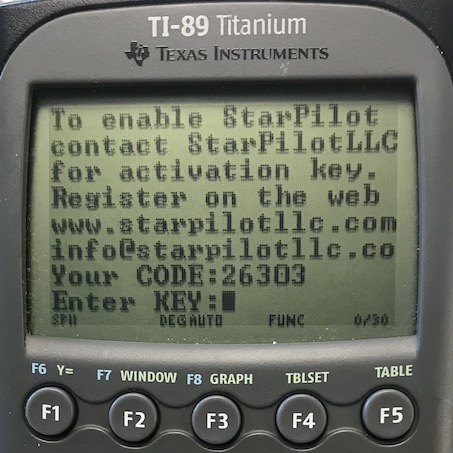
Register the software at which time we provide the numeric KEY which unlocks the program in your particular calculator. You can register online (see link below), or by phone, fax, or e-mail. Note you must install the program before registering it.
What happens when you download?
When you press "Download StarPilot" your computer will ask you where to store the self-extracting compressed file. Select a directory of your choice, and note it. This location is only used to launch the extraction of the actual program files. After the file has been downloaded, go to that location in your Windows Explorer and double click the file name. That will extract the program files and instructions into a new directory, which is convenient for using with the Ti Connect or GraphLink software. You have the option to change this directory if you like. Then you are ready to follow the instructions provided, which will load the program into your calculator.
Note: All file sizes are approximate, download times will vary depending on connection speeds.
Notice to Titanium and V200 users. Please execute the following instructions on your calculator before downloading the StarPilot.
- 1. Turn on the unit and execute the following sequence to reset the calculator to factory defaults
[2nd][MEM][F1][3][ENTER]
- 2. Execute [MODE][F3] and arrow down to App Desktop, hit the right arrow, and select OFF. Hit [ENTER] to make the change.
- 3. Continue with the installation instructions included with the software.
DOWNLOAD SOFTWARE HERE Read important note on downloading software at right.
StarPilot-PC
This version of the StarPilot runs on all Windows 32 machines.
6.5 Mb self extracting installation file.
StarPilot-89
This version of StarPilot runs on Texas Instruments TI-89 and Ti-89 Titanium calculators. Please see note below.
200K self extracting installation file.
StarPilot-V200
This version of StarPilot runs on Texas Instruments Voyage 200 calculators. Please see note below.
200K self extracting installation file.
StarPlilot-92+
This version of StarPilot runs on Texas Instrument TI-92 plus calculators. Please note that this software will not run on the older TI-92 calculators. You must have the plus model to make this version work. 200K self extracting installation file.
StarPilot-86
This version of StarPilot runs on Texas Instrument TI-86 calculators and can only be downloaded through Windows 98. 200K self extracting installation file.
|
|
See our TERMS of SALE page for payment options, warranty, shipping options and return policy.
|